Tweak Volume Bend
Entity Bendは、指定したAxisの周りでソリッドモデルを曲げます。曲げ処理では、一部の材料が伸び、別の部分が圧縮されますが、モデルのTopologyは維持されます。コマンド構文は次のとおりです。
Tweak {Volume|Body} <id_list> Bend Root <location_options> Axis <direction_vector> Direction <direction_vector> Radius <val> angle <val> [Preview] [Keep] [Center_bend] [Location <options>]
Root と axis で曲げ位置を決定します。 Direction で曲げ方向を決定します。 Radius と angle で曲げ量を決定します。 Center_bend を指定すると、曲げ位置を基準にVolumeの片側だけでなく両側を曲げます。 Location を使用すると、Volumeの特定部分だけを選択して曲げることができます。
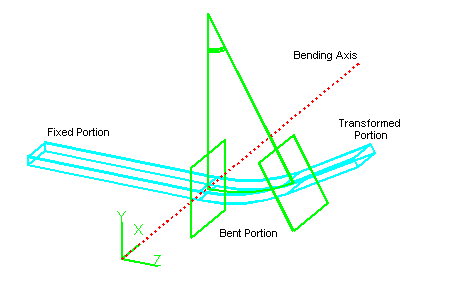
図1. Volumeの曲げ
#例: Locationオプションで指定したBody部分を曲げる
create brick width 11 height 1
create brick width 1 depth 10 height 10
create brick width 1 depth 10 height 10
create brick width 1 depth 10 height 10
move body 2 general location position -3 5 0
move body 3 general location position 0 5 0
move body 4 general location position 3 5 0
subtract body 2 from body 1
subtract body 3 from body 1
subtract body 4 from body 1
tweak volume 1 bend root 0 0 0 axis 1 0 0 direction 0 0 -1 radius 1 angle 3.14 location vertex 39 47