Tool BodyまたはSheet BodyによるWeb Cut
幾何モデル内に存在する任意のBodyを、他のBodyを切断するToolとして使用できます。コマンドは次のとおりです。
Webcut {blank} tool [body] <id> [webcut_options]
指定したTool Bodyを一連のブーリアン演算に使用し、Blankを2つ以上の部分へ分割します。
別の形式では、Curve Loopから一時的なSheet Bodyを作り、そのSheet BodyでBodyリストを切断します。このSheetは Create Surface Curve <id_list> コマンドで作成されるものと同じです。
Webcut {Body|Group} <id_range> [With] Loop [Curve] <id_range> NOIMPRINT|Imprint] [NOMERGE|Merge] [group_results]
Webcut {Volume|Body|Group} <id_range> [With] Bounding Box {Body|Volume|Surface|Curve|Vertex <id_range>} [Tight] [[Extended] {Percentage|Absolute} <val>] [{X|Width} <val>] [{Y|Height} <val>] [{Z|Depth} <val>]] NOIMPRINT|Imprint] [NOMERGE|Merge] [group_results]
最後の形式では、別のEntityのBounding BoxでBodyを切断します。このBounding Boxは tightまたはextended.
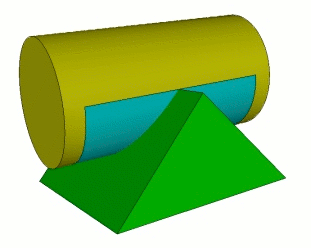
図1. PrismのBounding Boxで切断されたCylinder。