メッシュのコピー
適用対象:Curve、Surface、Volume
概要:あるentityのmeshを別entityへcopyします。
構文:
Curve <range> Scheme Copy source Curve <range> [Source Percent [<percentage> | auto]] [Source [combine|SEPARATE]] [Target [combine|SEPARATE]] [Source Vertex <id_range>] [Target Vertex <id_range>]]
Surface <id> Scheme Copy Source Surface <id> Source Curve <id> Target Curve <id> Source Vertex <id> Target Vertex <id> [Nosmoothing] [mirror]
Volume <range> Scheme Copy [Source Volume] <id> [[Source Surface <id> Target Surface <id>] [Source Curve <id> Target Curve <id>] [Source Vertex <id> Target Vertex <id>]][Nosmoothing]
Copy Mesh Curve <id> Onto Curve <curve_id_range> [Source Node <starting node id> <ending node id>] [Source Percent [<percentage>|auto]] [Source Vertex <id_range>] [Target Vertex <id_range>]
Copy Mesh Surface <surface_id> Onto Surface <surface_id> Source Vertex <id> Target Vertex <id> Source Curve <id> Target Curve <id> [interior (pair vertex <id> <id>) ...] [smooth] [mirror] [preview]
Copy Mesh Volume <volume_id> Onto Volume <volume_id> [Source Vertex <vertex_id> Target Vertex <vertex_id> [Source Curve <curve_id> Target Curve <curve_id>] [Nosmoothing]
関連コマンド:
Set Morph Smooth {on | off}
解説:
すでにmesh済みのsurface、volume、curve、またはcurve集合からmeshをcopyする場合、copy mesh schemeを使用できます。source entityがまだmeshされていない段階でschemeを設定しても構いません。必要ならsource entityを自動的にmeshしてからtarget entityへcopyします。source meshをtargetへどの向きで配置するかを指定するorientation dataも設定できます。たとえばcurve meshをcopyするとき、source上のどのvertex(source vertex)をtarget上のどのvertex(target vertex)へ対応させるかを指定できます。copyでmesh entityを参照する必要がある場合は、 Copy Mesh コマンドを使用します。orientation dataを指定しない、またはtarget上のorientationを完全に決めるには情報が不足する場合、copy algorithmが残りのorientation dataを自動推定します。矛盾または不適切なorientation dataが与えられた場合は、適切なmesh orientationになるまで情報の一部を破棄して解決を試みます。
curve mesh copyには、source curve meshの一部分だけをcopyするオプションがあります。extra keyword optionから利用できます。 percent オプションではsource meshの何%をcopyするか指定できます。この文脈のauto keywordは、sourceとtarget curveの長さの比から割合を自動計算します。 combine および separate keywordはcommand line optionの解釈方法に関係します。複数target curveそれぞれへsource meshの同じcopyを作る場合は target separate オプションを使います(既定)。source meshを複数target curveの範囲全体に分配する場合は target combine オプションを使います。source curveも同様に扱われます。
複数holeを持つsurfaceでmeshをcopyする場合、interior pair vertexの対応付けが必要になることがあります。algorithmが空間的位置から自動対応できない場合に指定します。オプションは Interior pair vertex <id> <id> ...
volume mesh copyはsurface copying schemeに依存するため、target volumeのsurfaceは事前にmeshされていてはいけません。
meshが常に完全なcopyになるとは限りません。geometry差やsmoothingによって一致しない場合があります。geometryが類似していればsmoothingをoffにしてexact copyを得られます。指定方法は Nosmoothing または Smoothを省略します。geometryが異なる場合はmorph smoothing flagをonにすると、meshを可能な限り対応させるspecial smootherが有効になります。
例:
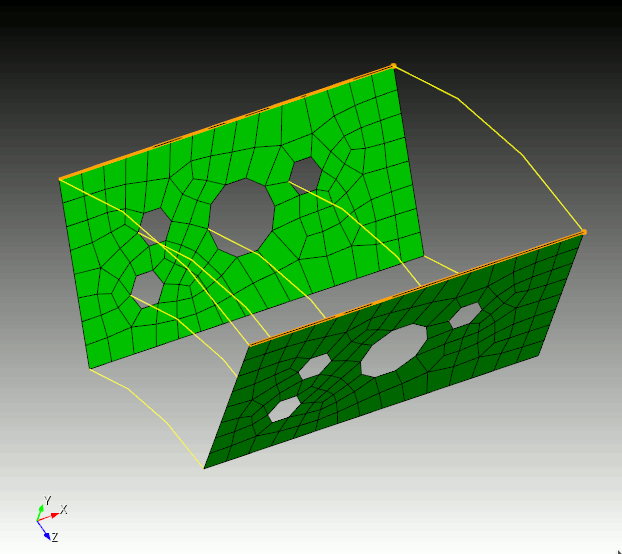
例として、次のコマンドでcopyします。
copy mesh surf 23 onto surf 14 source curve 1 source vertex 1 target curve 24 target vertex 20
sourceとtargetのvertexが対応してhighlightされ、source/target curveも対応してhighlightされます。source/target curve・vertexの対応がorientationの決定に使われます。