Sculpt境界層
メッシュ内に境界層を定義するための Sculpt オプションです。境界層は Surface に定義できる薄い Hex Layer で、Material から内向きまたは外向きに延びます。Hex Layer の数と厚さ、および Layer の Material ID を指定できます。Layer の厚さは通常、Cell Size に対して「薄く」設定します。Layer 同士は交差しないため、近接する Layer が重ならない Surface に定義してください。境界層は Material ID に基づいて指定し、その Material が他の Material と接する Surface、または Free Surface に Hex Layer が配置されます。
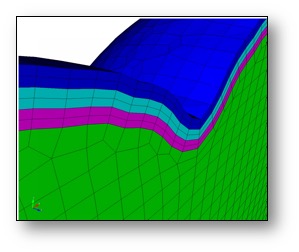
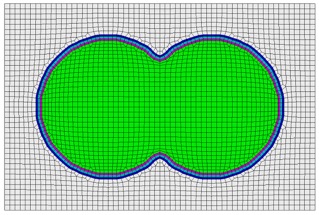
Boundary Layers              -bly     --boundary_layer
  --begin                    -beg  <arg> Begin specification blayer or blayer_block
  --end                      -zzz  <arg> End specification blayer or blayer_block
  --material                 -mat  <arg> Boundary layer material specification
  --num_elem_layers          -nel  <arg> Number of element layers in blayer block
  --thickness                -th   <arg> Thickness of first element layer in block
  --bias                     -bi   <arg> Bias of element thicknesses in blayer block

Sculpt Command Summary
境界層の開始
Command: begin     Begin specification blayer or blayer_block

Input file command:   begin <arg>
Command line options: -beg <arg>
Argument Type:        blayer, blayer_block
コマンド説明:
仕様 Block の開始を定義します。"end" 引数で閉じる必要があります。現在、次の仕様をサポートします。
blayer
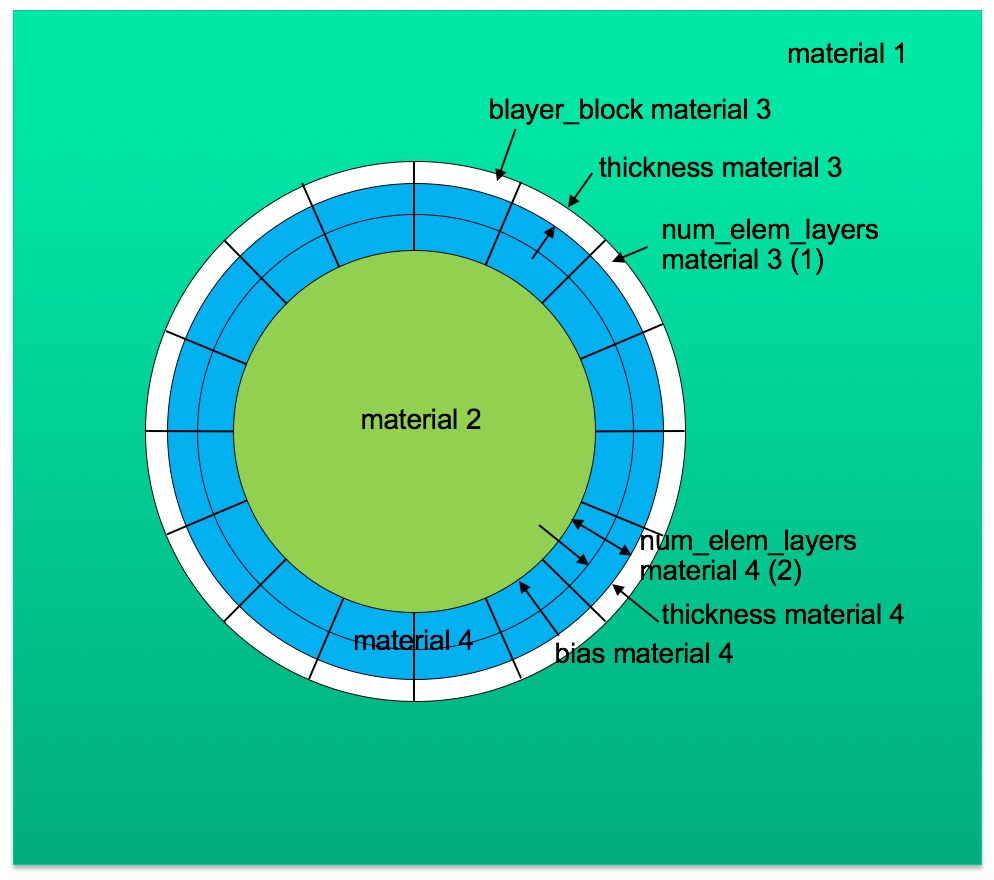
境界層の仕様を定義します。Hex Element の Layer は、指定した Material の Interface に配置されます。blayer 仕様で使用できる引数には material と begin blayer_block があります。
blayer_block
指定した blayer 定義内で、共通の Material ID を持つ Element Layer の集合を定義します。blayer_block 仕様で使用できる引数は material、num_elem_layers、thickness、bias です。
例:
次の例は Sculpt 入力ファイル内の境界層仕様を示します。この例では、Material 1 と 2 の Interface に2つの Boundary Layer Block を定義します。ID 3 と 4 の2つの Material Block が生成され、それぞれ1 Layer と2 Layer の Element Layer を持ちます。
       BEGIN BLAYER
         MATERIAL = 1 2
         BEGIN BLAYER_BLOCK
           MATERIAL = 3
           NUM_ELEM_LAYERS = 1
           THICKNESS = 0.1
         END BLAYER_BLOCK
         BEGIN BLAYER_BLOCK
           MATERIAL = 4
           NUM_ELEM_LAYERS = 2
           THICKNESS = 0.2
           BIAS = 1.3
         END BLAYER_BLOCK
       END BLAYER
境界層の終了
Command: end     End specification blayer or blayer_block

Input file command:   end <arg>
Command line options: -zzz <arg>
Argument Type:        blayer, blayer_block
コマンド説明:
仕様 Block の終了を定義します。前に "begin" 引数が必要です。現在、blayer と blayer_block 引数をサポートします。
境界層の Material
Command: material     Boundary layer material specification

Input file command:   material <arg>
Command line options: -mat <arg>
Argument Type:        integer > 0
コマンド説明:
境界層仕様内で Material ID を定義します。BLAYER 仕様内で使用する場合、境界層を生成する入力中の既存 Material を1つまたは2つ参照します。Material を1つ指定すると、指定 Material と隣接する任意の Material とのすべての Interface に Hex Layer が生成されます。Material ID を2つ指定すると、その2つの Material が隣接する Interface にのみ Layer が生成されます。
多くの場合、BLAYER 仕様の Material ID は、STL File や diatom primitive など特定の Geometry Insert 用に diatom file で定義された Material ID を参照します。Void Material ID(VOID_MAT)、または input_vfrac、input_micro、input_cart_exo、input_spn などの Volume Fraction 記述内の Material として定義することもできます。
BLAYER_BLOCK 仕様内で使用する場合、生成される新しい Block を参照し、blayer_block 内のすべての Element がその Block に割り当てられます。通常は、入力内でまだ参照されていない一意の Material ID を指定します。Material ID がすでに使用されている場合、blayer block 内の Element は既存の Material に追加されます。
BLAYER と BLAYER_BLOCK の両方で Material ID を定義する必要があります。この値に既定値はありません。
境界層の Element Layer 数
Command: num_elem_layers     Number of element layers in blayer block

Input file command:   num_elem_layers <arg>
Command line options: -nel <arg>
Argument Type:        integer > 0
コマンド説明:
BLAYER_BLOCK 仕様内で定義する Element Layer の数です。すべての BLAYER_BLOCK で num_elem_layers を定義する必要があります。
境界層の厚さ
Command: thickness     Thickness of first element layer in block

Input file command:   thickness <arg>
Command line options: -th <arg>
Argument Type:        floating point value
コマンド説明:
BLAYER_BLOCK で定義する第1 Layer の厚さです。値は絶対距離です。既定値はないため、すべての BLAYER_BLOCK で定義する必要があります。
境界層の Bias
Command: bias     Bias of element thicknesses in blayer block

Input file command:   bias <arg>
Command line options: -bi <arg>
Argument Type:        floating point value
コマンド説明:
BLAYER_BLOCK の追加 Layer に適用する Bias Factor です。THICKNESS パラメータ(第1 Layer の厚さ)と組み合わせて使用し、同じ BLAYER_BLOCK 内の後続 Element Layer の厚さに対する倍率を定義します。BIAS の既定値は1.0で、省略可能です。