Sculpt出力
Sculpt の Output 指定オプションです。Sculpt が生成する Hex Mesh の主な形式は Exodus II です。-j または num_procs 引数に基づき Processor ごとに1つの Exodus File を生成します。必要に応じて epu Utility で結合できます。
その他の Export Option として、入力 Geometry の Volume Fraction 表現を出力する機能や、Cubit で使用する Geometry File を書き出す機能があります。
Output                       -out     --output
  --exodus_file              -e    <arg> Output Exodus file base name
  --large_exodus             -le   <arg> Output large Exodus file(s)
  --volfrac_file             -vf   <arg> Output Volume Fraction file base name
  --quality                  -Q    <arg> Dump quality metrics to file
  --export_comm_maps         -C          Export parallel comm maps to debug exo files
  --write_geom               -G          Write geometry associativity file
  --write_mbg                -M          Write mesh based geometry file <beta>
  --compare_volume           -cv         Report vfrac and mesh volume comparison
  --compute_ss_stats         -css        Report sideset statistics

Sculpt Command Summary
Exodus File
Command: exodus_file     Output Exodus file base name

Input file command:   exodus_file <arg>
Command line options: -e <arg>
Argument Type:        character string
コマンド説明:
生成される Exodus Mesh の Base File Name です。Exodus File は <exodus_file>.e.<nproc>.<iproc> の形式になります。たとえば Processor 数が3で exodus_file 引数が "model" の場合、次のファイルを出力します:
    model.e.3.0
    model.e.3.1
    model.e.3.2
exodus_file 引数を使用しない場合、出力は <stl_file>_diatom_results.e.<nprocs>.<iproc> 形式になります。たとえば Processor 数が3で stl_file(または diatom_file)が "model.stl" の場合、次のファイルを出力します:
    model_diatom_results.e.3.0
    model_diatom_results.e.3.1
    model_diatom_results.e.3.2
Base Exodus File Name には Full Path を指定できます。指定しない場合は Current Working Directory に出力します。exodus_file Option を使用しない場合、Exodus File は入力 Diatom/STL File と同じ Directory に配置されます。
Large Exodus Output
Command: large_exodus     Output large Exodus file(s)

Input file command:   large_exodus <arg>
Command line options: -le <arg>
Argument Type:        no argument
Input arguments: off (0)
                 false (0)
                 on (1)
                 true (1)
コマンド説明:
ID が 2^31(約21.4億)を超えられる Exodus File を出力します。HPC Platform 上で数十億 Element を Parallel 生成する場合に使用します。Output Exodus File の Size が約2倍になるため、通常は非常に大規模な Parallel Application でのみ使用します。
Volume Fraction File
Command: volfrac_file     Output Volume Fraction file base name

Input file command:   volfrac_file <arg>
Command line options: -vf <arg>
Argument Type:        character string
コマンド説明:
任意で、Volume Fraction Data を Element Variable として含む Cartesian Grid の Hex Mesh を Exodus File に生成します。この Parallel Exodus File 群は後で --input_vfrac(-ivf)Command を使って Sculpt への直接入力にできます。未指定の場合、Volume Fraction Data File は生成されません。
Quality
Command: quality     Dump quality metrics to file

Input file command:   quality <arg>
Command line options: -Q <arg>
Argument Type:        file name with path
コマンド説明:
Mesh Quality Metric の出力 File Name を指定します。既存 File がある場合は追記します。Quality Metric と実行詳細がこの File に書き込まれます。現在この Option は既定で Off です。
Export Communication Maps
Command: export_comm_maps     Export parallel comm maps to debug exo files

Input file command:   export_comm_maps
Command line options: -C
コマンド説明:
Debug と Verification 用です。Processor Boundary の Communication Node/Face を含む Mesh の Exodus File を Node/Sideset として出力します。Parallel Communication Map の妥当性を視覚的に確認できます。
S2G Geometry File の出力
Command: write_geom     Write geometry associativity file

Input file command:   write_geom
Command line options: -G
コマンド説明:
この引数を使用すると <fileroot>.s2g 形式の s2g(Sculpt to Geometry)File を生成します。fileroot は --exodus_file または -e で指定した文字列です。s2g File には出力 Exodus File の Geometry Associativity が含まれます。Cubit の "import s2g <fileroot>" と組み合わせると、s2g File を介して Sculpt が指定した Geometric Entity を持つ Mesh-Based Geometry を Cubit 内に生成できます。
--trimesh Option と併用すると、s2g File は Surface のみが Meshed された Mesh-Based Geometry Volume 群を Cubit で構築するための情報を提供できます。Sculpt が生成した Discrete Geometry を Cubit の Tet Meshing 機能でメッシュ化する際に有効です。たとえば Microstructure の spn Data(import_spn 参照)から次の Workflow で Tet Mesh を作成できます:
- Sculpt を実行して Exodus File と s2g File を生成します。入力例:
begin sculpt import_spn = myfile.spn trimesh = true write_geom = true pillow = 1 end sculpt - Cubit に File を Import して Mesh-Based Geometry を生成します:
import s2g myfile - Triangle Mesh を削除し、Size を設定して Mesh を生成します:
     delete mesh
     vol all scheme tetmesh
     vol all size 2.0
     mesh vol all
write_geom と trimesh Option は現在も開発中で、現時点では Single Processor(-j 1)でのみ動作します。
Mesh-Based Geometry の出力
Command: write_mbg     Write mesh based geometry file <beta>

Input file command:   write_mbg
Command line options: -M
コマンド説明:
この引数を使用すると <fileroot>.mbg 形式の MBG(Mesh Based Geometry)File を生成します。fileroot は --exodus_file または -e で指定した文字列です。MBG File には Interface Reconstruction の結果として Sculpt が定義した Surface と Topology が含まれます。これは Exodus File に生成された3D Element の境界、または --trimesh Option で生成した Surface Element に対応します。
MBG File は次の Cubit Command Line Option で Import できます:
import mbg "<fileroot>.mbg"
VFrac と Mesh Volume の比較レポート
Command: compare_volume     Report vfrac and mesh volume comparison

Input file command:   compare_volume
Command line options: -cv
コマンド説明:
Mesh Summary の後に、入力 Geometry の Volume Fraction と最終 Finite Element Mesh の Volume Fraction を比較する Report を Terminal に出力します。入力に Volume Fraction Format を使用しない場合は、Refined Base Grid 上で Volume Fraction を計算して比較に使用します。STL または Analytic Geometry の厳密な Geometry Volume ではなく、Refined Cartesian Grid 上の Geometry Volume Fraction 近似を比較します。
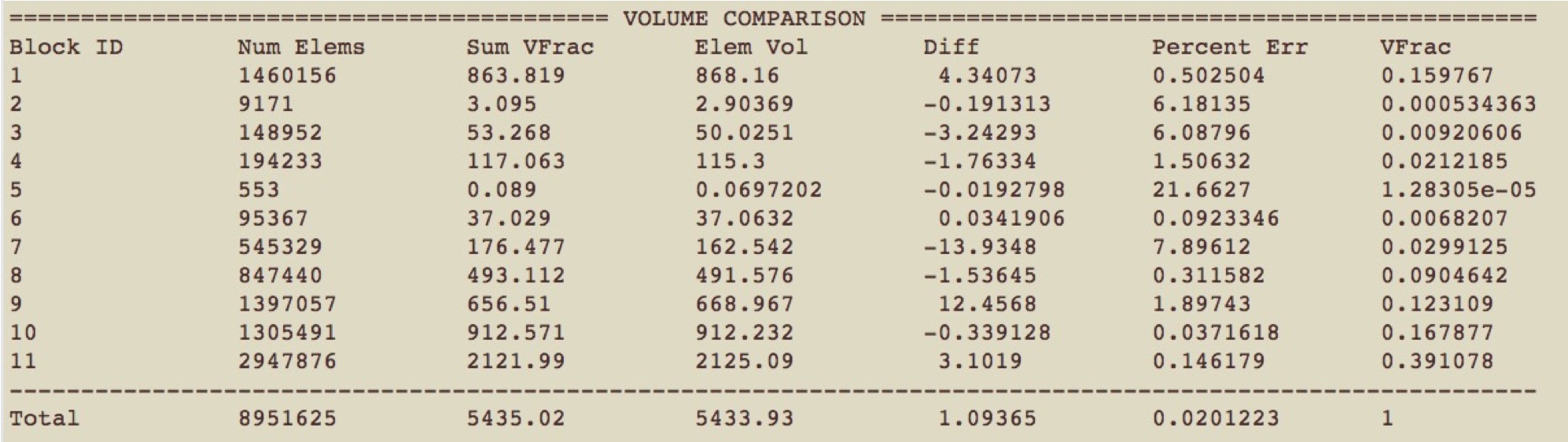
各列の概要:
- Block ID: Material/Block の ID
- Num Elems: 最終 Mesh で Block に割り当てられた Hex Element 数
- Sum VFrac: Block の入力 Volume Fraction の合計。STL または Diatom Geometry では Volume Fraction を近似し、3D Image Data(bitmap、input_spn など)では入力 Volume Fraction を厳密に合計します。
- Elem Vol: Block の最終 Mesh Volume の合計
- Diff: Block の入力/出力 Volume Fraction の絶対差(Elem Vol - Sum VFrac)
- Percent Err: Block の入力/出力 Volume Fraction 差を Percentage Error で表した値
- VFrac: Block の Elem Vol. が表す総 Volume Fraction。VFrac Volume の合計は1.0になる必要があります。
Sideset Statistics レポート
Command: compute_ss_stats     Report sideset statistics

Input file command:   compute_ss_stats
Command line options: -css
コマンド説明:
Mesh Summary の後に、最終 FEA Mesh の Sideset Surface Area Statistics を Terminal へ出力します。Material 間 Interface Area が重要な Microstructure 用途などで有用です。この Option は gen_sidesets Option と併用する必要があります。