Coreform DAGMC モデル準備・出力チュートリアル
このチュートリアルについて
このチュートリアルではDirect Accelerated Monte Carlo(DAGMC)toolkitをparticle transport codeで利用するためのmodel preparationを学びます。まずfuel、gap、claddingを表す3本の同心円筒とwater moderatorのbrickからなる単純なPWR fuel pinを作成し、その後より複雑なtokamak reactorの例へ進みます。
PWR fuel pin
形状の作成
fuel pin、gap、claddingの外半径をそれぞれ0.39 cm、0.4 cm、0.45 cmとし、water moderatorの幅を1.26 cmとして形状を作成します。実機fuel pinは通常120〜200 cmですが、可視化しやすいよう10 cmでmodel化します。
import os
import sys
path_to_cubit = "/home/gvernon2/cubit/build_lin64/bin/Release"
sys.path.append( path_to_cubit )
import cubit
cubit.init( ['cubit', '-driver', 'offscreen', "-noecho", "-nojournal" ] )
cubit.cmd( "reset" )
cubit.cmd( "create cylinder radius 0.39 height 10" )
cubit.cmd( "create cylinder radius 0.4 height 10" )
cubit.cmd( "create cylinder radius 0.45 height 10" )
cubit.cmd( "create brick x 1.26 y 1.26 z 10" )

cubit.cmd( "remove overlap volume 3 4 modify volume 4" )
cubit.cmd( "remove overlap volume 2 3 modify volume 3" )
cubit.cmd( "remove overlap volume 1 2 modify volume 2" )
cubit.cmd( "merge all" )

cubit.cmd( "compress ids" )
...deleting 7071 tris from database...
...deleting 10379 edges from database...
...deleting 3323 nodes from database...
Successfully created cylinder volume 1
Successfully created cylinder volume 2
Successfully created cylinder volume 3
Successfully created brick volume 4
Created volume(s): 5
Updated volume(s): 4
Destroyed volume(s): 5
Created volume(s): 6
Updated volume(s): 3
Destroyed volume(s): 6
Created volume(s): 7
Updated volume(s): 2
Destroyed volume(s): 7

...Merging all features in the model

...Merging all Surfaces in the model
Comparing Surfaces:
Comparing 18 Surfaces for Merge
0   |    |    |    |    50   |    |    |    |  100
**************************************************
Consolidated 3 pairs of surfaces

...Merging all Curves in the model
Consolidated 0 curves

...Merging all Vertices in the model
Consolidated 0 pairs of vertices
All detected matches successfully merged
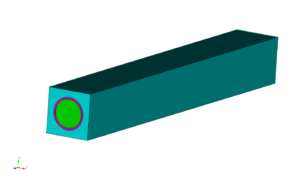
このmodelではfuel、gap、cladding、moderator領域が適切にsubtractされた形状を作成済みです。export前にcoincident volumeのfaceをshared surfaceとしてmergeし、mesh生成し、material/boundary conditionを設定します。
形状の確認
DAGMCではparticleをvolume間で確実に移動させるため、接するvolume同士がsurfaceを共有する必要があります。triangle meshのtopology情報を利用し、particleがshared surfaceを横切るとlogical containmentを次のvolumeへ切り替えます。
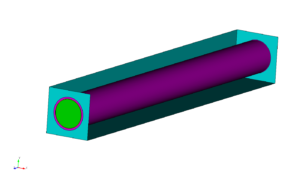
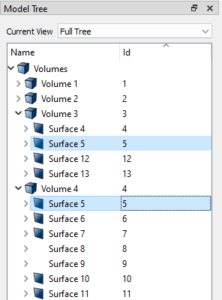
モデルツリー(下図)を確認すると、隣接するボリュームが実際にサーフェスを共有していることが分かります。モデルツリーでは、 volume 4 (シアン)が共有している surface 5 with volume 3 (ピンク)を確認できます。このモデルの最終ボリュームは他のボリュームをsubtractして作成されているため、このトポロジー整合性は保証されます。ただし常にそうとは限らず、後ほど示すように、metadataを設定する前にモデルをimprintしてからmergeする必要がある場合があります。
MaterialとBoundary Conditionの設定
DAGMC modelではvoid領域を含む全volumeにmaterial assignmentが必要です。Cubitではmaterialごとにblockを作成し、volume surface meshをblockへ割り当てます。create block 1
block 1 add volume 1
create material 1 name "fuel"
block 1 material "fuel"
block 1 volume 1
2, 3, and 5 に対して、material名 vacuum, clad, moderator をそれぞれ指定して繰り返します。
cubit.cmd( "create block 1" )
cubit.cmd( "block 1 add volume 1" )
cubit.cmd( "create block 2" )
cubit.cmd( "block 2 add volume 2" )
cubit.cmd( "create block 3" )
cubit.cmd( "block 3 add volume 3" )
cubit.cmd( "create block 4" )
cubit.cmd( "block 4 add volume 4" )

cubit.cmd( "create material 1 name 'fuel'" )
cubit.cmd( "create material 2 name 'vacuum'" )
cubit.cmd( "create material 3 name 'clad'" )
cubit.cmd( "create material 4 name 'moderator'" )

cubit.cmd( "block 1 material 'fuel'" )
cubit.cmd( "block 2 material 'vacuum'" )
cubit.cmd( "block 3 material 'clad'" )
cubit.cmd( "block 4 material 'moderator'" )
Added Volume 1 to block 1
Added Volume 2 to block 2
Added Volume 3 to block 3
Added Volume 4 to block 4


Created material 1.
Created material 2.
Created material 3.
Created material 4.
create sideset 1
sideset 1 name 'boundary:reflecting'

sideset 1 add surface 2 3 10 11 12 13 14 15
sideset 1 add surface 6 7 8 9
cubit.cmd( "create sideset 1" )
cubit.cmd( "sideset 1 name 'boundary:reflecting" )
cubit.cmd( "sideset 1 add surface 2 3 10 11 12 13 14 15" )
cubit.cmd( "sideset 1 add surface 6 7 8 9" )
Set name of sideset 1 to "boundary:reflecting"
Added Surface 2 to sideset 1
Added Surface 3 to sideset 1
Added Surface 10 to sideset 1
Added Surface 11 to sideset 1
Added Surface 12 to sideset 1
Added Surface 13 to sideset 1
Added Surface 14 to sideset 1
Added Surface 15 to sideset 1
Added Surface 6 to sideset 1
Added Surface 7 to sideset 1
Added Surface 8 to sideset 1
Added Surface 9 to sideset 1
モデルのメッシュ生成
geometryとboundary conditionを確認したらmodelをmesh化します。ここではsurface trimesherのcoarse mesh settingsを使用します。
- Select
Mesh->Surface->Mesh->Trimeshコマンドパネルで
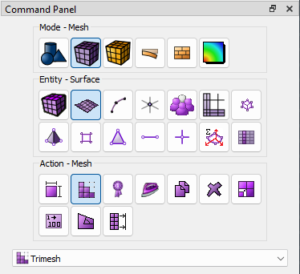
- Then enter
allinto theサーフェスを選択のpickwidgetにallを入力し、次のチェックボックスを有効にします。粗いメッシュ設定
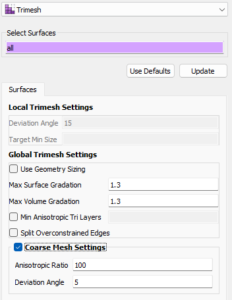
cubit.cmd( "set trimesher coarse on ratio 100 angle 5" )
cubit.cmd( "surface all scheme trimesh" )
cubit.cmd( "mesh surface all" )
Calculating Auto Size
0   |    |    |    |    50   |    |    |    |  100
**************************************************
Matching intervals successful.
Begin tri meshing 15 surfaces 1 to 15
Meshing surfaces
0   |    |    |    |    50   |    |    |    |  100
*************************************************
Completed tri meshing 15 surfaces with 847 tris
Surfaces 1 to 15 meshing completed using scheme: trimesh
Generated 847 tris
cubit.cmd( "surf all visibility on")
cubit.cmd( f"hardcopy '{os.path.join( os.getcwd(), 'images', 'pwr_mesh_overview.png' )}' png window 2" )
cubit.cmd( "draw vol 1" )
cubit.cmd( f"hardcopy '{os.path.join( os.getcwd(), 'images', 'pwr_mesh_fuel.png' )}' png window 2" )
- 最後に
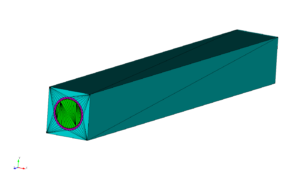
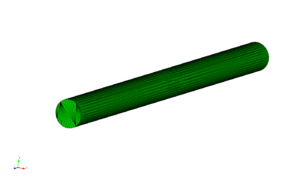
Meshボタンをクリックします。生成されたメッシュは下図と同様になります。
モデルのExport
最後にDAGMC modelをexportします。 File -> Export... ファイルメニューから選択し、続いて DAGMC (*.h5m) を選択して出力ファイル名を指定します。
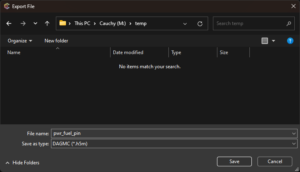
同じ処理は dagmc exportコマンドではfiletypeに export commandからも実行できます。
export dagmc "pwr_fuel_pin.h5m"
生成されたfileはDAGMC geometryを利用するparticle transport simulationで使用できます。
cubit.cmd( "export dagmc 'pwr_fuel_pin.h5m' overwrite" )
Found 14 entities of dimension 0
Found 18 entities of dimension 1
Found 15 entities of dimension 2
Found 4 entities of dimension 3
トカマクモデル
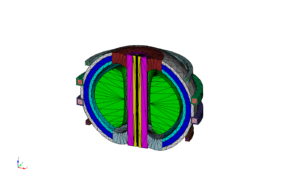
このセクションでは、トカマク設計用の Paramak ツールで生成したトカマクモデルを扱います。このモデル(ここからダウンロード)には高次サーフェスが含まれており、多くの粒子輸送コードに搭載される標準的なconstructive solid geometry(CSG)エンジンではモデル化が難しい場合があります。
Select File -> Open を選択し、 tokamak.cub5 下記のファイルを指定します。
https://coreform.com/downloads/tokamak_w_mats.cub5
cubit.cmd( "reset" )
cubit.cmd( "open './files/tokamak.cub5'" )
...deleting 847 tris from database...
...deleting 1161 edges from database...
...deleting 316 nodes from database...
Geometry engine set to: ACIS Version 33.0.0.0
Geometry engine set to: ACIS Version 33.0.0.0
Read 16 ACIS Entities from the input file
Progress
Processing 16 ACIS Entities
0   |    |    |    |    50   |    |    |    |  100
**************************************************

Progress
Building 16 CUBIT Entities
0   |    |    |    |    50   |    |    |    |  100
**************************************************

Constructed 16 Volumes: 1 to 16
WARNING: 16 invalid names were found during import.

Geometry engine set to: ACIS Version 33.0.0.0
Successfully opened CUBIT file './files/tokamak.cub5'
cubit.cmd( "graphics perspective off" )
cubit.cmd( "graphics parallel scale  796.92089" )
cubit.cmd( "from  1420.9563 -3228.8524   1668.639" )
cubit.cmd( "at   -92.083092  311.58432 -42.365141" )
cubit.cmd( "up   -0.15198041  0.37666499  0.91379727" )

cubit.cmd( f"hardcopy '{os.path.join( os.getcwd(), 'images', 'tokamak_geometry_overview.png' )}' png window 2" )
次のモデルが表示されます。
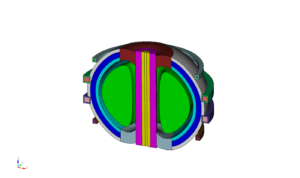
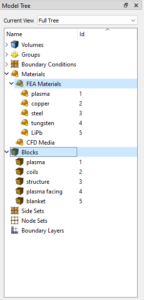
このモデルにはすでにmaterialが設定されているため、その作業を繰り返す必要はありません。
Imprintとmerge
ただし、このモデルには追加の処理が必要です。volume 3 and 7.
draw vol 3 7
graphics mode transparent
cubit.cmd( "draw vol 3 7" )
cubit.cmd( "graphics mode transparent" )
cubit.cmd( "from  3190.5998    -2173.531  1818.3984" )
cubit.cmd( "at    -345.81134   264.83695  161.32015" )
cubit.cmd( "up    -0.30323586  0.19420683 0.93291571" )
cubit.cmd( "zoom reset" )
cubit.cmd( f"hardcopy '{os.path.join( os.getcwd(), 'images', 'tokamak_geometry_vol_3_7_detail.png' )}' png window 2" )
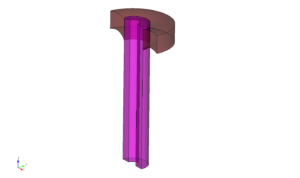
モデルツリーを見ると、この2つのvolumeがサーフェスを共有していないことが分かります。imprintとmergeを行わない場合、粒子は volume 3 (紫)からsurfaceを横切って出て、 surface 41 volume間にある implicit complement(暗黙補領域) と呼ばれる領域に入り、その後 volume 7 through surface 111へ進みます。implicit complementは、CADモデル内で未定義のすべての空間を占める、DAGMCが構築する論理volumeです。幾何学的にはCAD bodyの「負」の領域に相当します。implicit complementはモデルのトポロジーだけに基づき、surfaceは 41 and 111 トポロジー上片側にしかvolumeを持たないため、implicit complementがそれらのsurface間の論理空間を占めます。
cubit.cmd( "graphics mode smoothshade" )
cubit.cmd( "draw surface 41 111" )
cubit.cmd( "locate surface 41 111")
cubit.cmd( f"hardcopy '{os.path.join( os.getcwd(), 'images', 'tokamak_geometry_vol_3_7_surface_detail.png' )}' png window 2" )
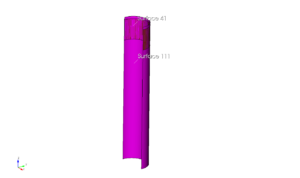
堅牢なDAGMCモデルを作るには、これらのsurfaceをimprintしてmergeする必要があります。これによりvolume 3 and 7 が接する位置に、単一の共有surfaceが生成されます。DAGMCファイルのmodel topologyでは、 volume 3 がこのsurfaceの片側、 volume 7 が反対側にあることが示されます。これによりsimulation中、粒子はimplicit complementへ入ることなく、volume間を効率的かつ堅牢に移動できます。
まずsurfaceのimprintとmergeを行います。modelをimprintするには次を実行します。
imprint volume 3 7
cubit.cmd( "imprint volume 3 7" )
Group imprint finished.
Updated volume(s): 3
IMPRINT completed.
cubit.cmd( "display" )
cubit.cmd( "draw surface 41 118 119 120" )
cubit.cmd( "zoom reset" )
cubit.cmd( "locate surface 41 118 119 120" )
cubit.cmd( f"hardcopy '{os.path.join( os.getcwd(), 'images', 'tokamak_geometry_vol_3_7_surface_imprint_detail.png' )}' png window 2" )
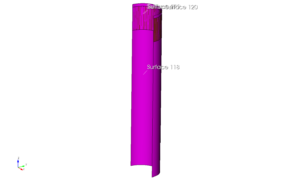
imprintコマンドは新しいsurfaceを生成します。 locate の新しいsurfaceを volume 3 で確認すると、そのうちの1つであるsurface 119が surface 41 of volume 7.
Surfaces 119 and 41 とはまだ別surfaceのままです。この時点でmeshしてDAGMC modelをexportすると、粒子は依然として volume 3 to volume 7 からimplicit complementを経由して移動します。単一の共有surfaceにするため、volume 3 and 7:
merge volume 3 7
cubit.cmd( "merge volume 3 7" )
Comparing Surfaces:
Comparing 14 Surfaces for Merge
0   |    |    |    |    50   |    |    |    |  100
**************************************************
Consolidated 1 pair of surfaces
Comparing Curves:
Comparing 30 Curves for Merge
0   |    |    |    |    50   |    |    |    |  100
**************************************************
Consolidated 0 pair of curves
Consolidated 0 pairs of vertices
cubit.cmd( "display" )
cubit.cmd( "draw surface 118 120 41" )
cubit.cmd( "zoom reset" )
cubit.cmd( "locate surface 118 120 41" )
cubit.cmd( f"hardcopy '{os.path.join( os.getcwd(), 'images', 'tokamak_geometry_vol_3_7_surface_imprint_merge_detail.png' )}' png window 2" )
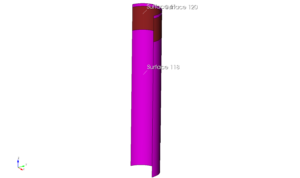
この処理が完了すると、 surface 42 が両方のvolumeに存在するようになります。
完全に堅牢なmodelにするため、次のコマンドでmodel全体にこの操作を行います。
imprint all
merge all
cubit.cmd( "imprint all" )
cubit.cmd( "merge all" )
Imprinting 16 ACIS Bodies
0   |    |    |    |    50   |    |    |    |  100
**************************************************
Group imprint finished.
Updated volume(s): 3, 7, 8, 14, 15
IMPRINT completed.

...Merging all features in the model

...Merging all Surfaces in the model
Comparing Surfaces:
Comparing 128 Surfaces for Merge
0   |    |    |    |    50   |    |    |    |  100
**************************************************
Consolidated 32 pairs of surfaces

...Merging all Curves in the model
Comparing Curves:
Comparing 183 Curves for Merge
0   |    |    |    |    50   |    |    |    |  100
**************************************************
Consolidated 0 pair of curves

...Merging all Vertices in the model
Consolidated 0 pairs of vertices
All detected matches successfully merged
cubit.cmd( "display" )
cubit.cmd( "draw surf all with is_merged" )
cubit.cmd( "draw curve all add" )
cubit.cmd( "color curve all black" )
cubit.cmd( "color curve all in surface with is_merged white" )
cubit.cmd( "zoom reset" )
cubit.cmd( f"hardcopy '{os.path.join( os.getcwd(), 'images', 'tokamak_geometry_merged_surfaces.png' )}' png window 2" )
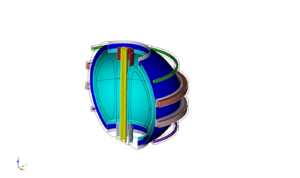
これで完了です。先ほどと同じようにmodelをmeshし、DAGMC fileをexportできます。
set trimesher coarse on ratio 100 angle 5
surface all scheme trimesh
mesh surface all

export dagmc "paramak.h5m"
cubit.cmd( "set trimesher coarse on ratio 100 angle 5" )
cubit.cmd( "surface all scheme trimesh" )
cubit.cmd( "mesh surface all" )

cubit.cmd( "export dagmc 'paramak.h5m' overwrite" )
Matching intervals successful.
Begin tri meshing 96 surfaces 1 to 11, 13 to 20, 22 to 26, 28 to 80, 85 to 87,
   93 to 95, 101 to 106, 120, 121, 123, 130, 133, 134, 137
Meshing surfaces
0   |    |    |    |    50   |    |    |    |  100
*************************************************
Meshing surfaces
0   |    |    |    |    50   |    |    |    |  100
*************************************************
Meshing surfaces
0   |    |    |    |    50   |    |    |    |  100
*************************************************
Meshing surfaces
0   |    |    |    |    50   |    |    |    |  100
*************************************************
Completed tri meshing 96 surfaces with 7071 tris
Surfaces 1 to 11, 13 to 20, 22 to 26, 28 to 80, 85 to 87, 93 to 95, 101 to 106,
   120, 121, 123, 130, 133, 134, 137 meshing completed using scheme: trimesh
Generated 7071 tris
Found 110 entities of dimension 0
Found 183 entities of dimension 1
Found 96 entities of dimension 2
Found 16 entities of dimension 3
cubit.cmd( "display" )
cubit.cmd( "color curve all black" )
cubit.cmd( "graphics perspective off" )
cubit.cmd( "graphics parallel scale  796.92089" )
cubit.cmd( "from  1420.9563 -3228.8524   1668.639" )
cubit.cmd( "at   -92.083092  311.58432 -42.365141" )
cubit.cmd( "up   -0.15198041  0.37666499  0.91379727" )
cubit.cmd( "zoom reset" )
cubit.cmd( f"hardcopy '{os.path.join( os.getcwd(), 'images', 'tokamak_mesh_overview.png' )}' png window 2" )