ジオメトリの簡略化
この reduce オプションは、特定種類のジオメトリに対して自動DefeatureおよびSimplificationを行います。主にfastenerやspringを、解析に使用しやすい表現へ迅速に変更するために使用します。たとえばboltのCAD表現にはthread、fillet、chamfer、cavityが含まれ、周辺ジオメトリとoverlapしている場合もあります。 reduce オプションは、指定した recipeに従って、自動Defeature、Webcut、周辺ジオメトリの変更、Mesh生成、境界条件の適用まで行えます。現在bolt向けに利用できるReduce recipeは限定されていますが、次のものがサポートされています。
- Reduce Simplify
- Reduce Bolt Fit Volume
- Reduce Bolt Core
- Reduce Bolt Spider
- Reduce Spring
- Reduce Thin Volumes
- Reduce Thin Volumes with Reinforcement Learning
- Reduce Slot Surface
| Reduce Recipe | コマンド構文 | 説明 | |
| Reduce Bolt (Simplify) | reduce volume <id_list> | Simplify/Defeature bolt geometry only | 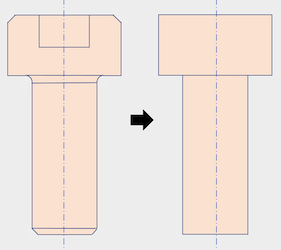 |
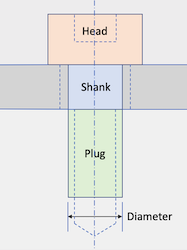
| Reduce Bolt Fit Volume | reduce volume <id_list> bolt fit_volume | Simplify bolt and fit to surrounding geometry |
 |
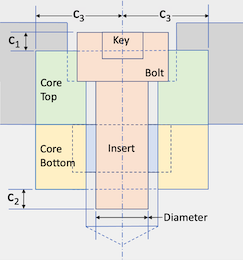
| Reduce Bolt Core | reduce volume <id_list> bolt core | Simplify bolt and insert surrounding core geometry |
 |
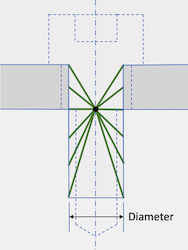
| Reduce Bolt Spider | reduce volume <id_list> bolt spider | Remove bolt and replace with spider mesh |
 |
| Reduce Bolt Patch | reduce volume <id_list> bolt patch | Remove bolt and replace with a circular sideset patch |
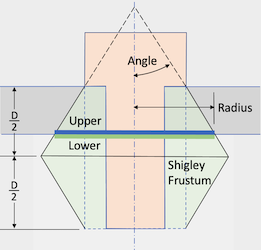 |
| Reduce Spring | reduce volume <id_list> spring | Spring断面中心に沿うCurveを作成します |
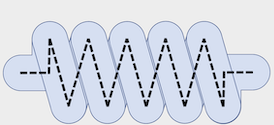 |
| Reduce Thin Volume | reduce volume <id_list> thin auto | 薄い3D Volumeを接続された2D Shell Surface群へReduceします |
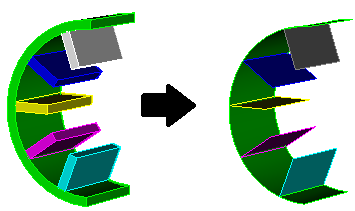 |
| Reduce Thin Volume RL | reduce volume <id_list> thin RL | Machine LearningおよびReinforcement Learningを使用して、薄い3D Volumeを接続された2D Shell Surface群へReduceします。関連項目: Geometry Power ToolによるBeam/Shellモデリング |
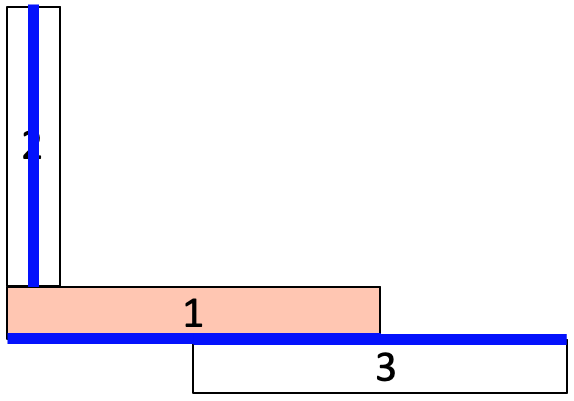 |
| Reduce Slot Surface | reduce surface <id> slot | Electromagnetics解析向けに、Slot Surfaceを分割・準備するためのdecomposition機能を提供します。関連項目: Geometry Power ToolによるSlot Surface準備 |
 |
この reduce コマンドは、しばしば Geometry Power Tool および Machine Learning Classification 機能と組み合わせて使用します。Classification Toolは、bolt、nut、washer、springなど一般的な形状に従ってVolumeを分類できます。